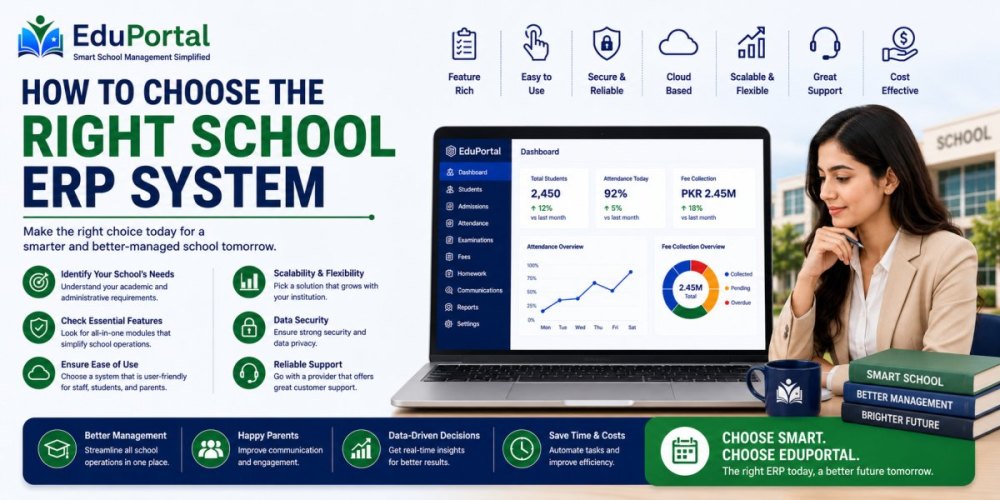
How to Choose the Right School ERP System in 2026: A Complete Guide for School Owners & Administrators
Meta Title: How to Choose the Right School ERP System in 2026 | Complete Buyer's Guide
Meta Description: Learn how to choose the best School ERP System for your institution. Compare features, evaluate vendors, avoid common mistakes, and discover what schools should look for in 2026.
Quick Answer
Choosing the right School ERP System is one of the most important decisions a school can make. The ideal ERP should help manage admissions, attendance, fee collection, examinations, parent communication, reporting, and daily operations from a single platform. Schools should prioritize ease of use, mobile accessibility, cloud hosting, scalability, and reliable support instead of selecting software based solely on price.
Why Choosing the Right School ERP Matters More Than Ever
Schools today are expected to deliver excellent educational experiences while managing increasing administrative responsibilities.
Admissions, attendance, fee collection, examinations, academic records, staff management, parent communication, and reporting all require significant time and resources.
When these processes are handled manually, schools often face:
-
Administrative inefficiencies
-
Delayed communication
-
Data inaccuracies
-
Fee recovery challenges
-
Poor reporting visibility
-
Increased workload for staff
A well-implemented School ERP solves these challenges by centralizing operations and automating repetitive tasks.
What Is a School ERP System?
A School ERP (Enterprise Resource Planning) System is an integrated software solution designed specifically for educational institutions.
Instead of using separate systems for admissions, attendance, fee management, examinations, and communication, schools can manage everything from one centralized platform.
A modern ERP serves:
-
School Owners
-
Principals
-
Administrators
-
Teachers
-
Parents
-
Students
-
Finance Departments
The objective is simple: improve efficiency, transparency, and decision-making.
Step 1: Identify Your School's Biggest Challenges
Before evaluating software providers, identify the problems your school is trying to solve.
Ask yourself:
Are fee collections becoming difficult?
You may need:
-
Automated fee vouchers
-
Online payment tracking
-
Fee reminders
-
Financial reporting
Is parent communication inconsistent?
You may need:
-
Parent Mobile App
-
Push Notifications
-
SMS Integration
-
School Announcement System
Is attendance management consuming too much time?
You may need:
-
Digital Attendance Tracking
-
Biometric Integration
-
Mobile Attendance
-
Automated Alerts
Understanding your pain points will help you select the right solution.
Step 2: Define Your Requirements Clearly
Every institution is different.
A school with 300 students has different needs compared to a school network managing multiple campuses.
Create a requirements checklist including:
-
Student Strength
-
Number of Branches
-
Fee Structure Complexity
-
Examination Requirements
-
Parent Communication Needs
-
Reporting Requirements
-
Mobile App Requirements
This prevents unnecessary spending on features you may never use.
Step 3: Evaluate Essential ERP Features
The best School ERP systems include the following modules:
Student Information Management
A centralized student database should include:
-
Admission Records
-
Academic History
-
Attendance Records
-
Contact Information
-
Performance Reports
Attendance Management
Look for:
-
Daily Attendance
-
Mobile Attendance
-
Biometric Support
-
Parent Notifications
-
Attendance Reports
Attendance remains one of the most frequently used ERP functions.
Fee Management System
A modern fee module should support:
-
Automated Fee Generation
-
Fee Reminders
-
Fine Calculations
-
Online Payment Tracking
-
Financial Reports
Schools using automated fee systems often experience better collection efficiency.
Examination Management
The ERP should support:
-
Exam Scheduling
-
Marks Entry
-
Grade Calculations
-
Report Cards
-
Performance Analytics
Parent Mobile App
Parents increasingly expect real-time access to information.
A Parent App should allow:
-
Attendance Tracking
-
Result Viewing
-
Homework Monitoring
-
Fee Updates
-
School Announcements
Strong parent engagement leads to better student outcomes.
Teacher Mobile App
Teachers should be able to:
-
Mark Attendance
-
Upload Homework
-
Enter Marks
-
Access Timetables
-
Communicate with Parents
Mobile accessibility improves productivity significantly.
Step 4: Cloud-Based ERP vs Traditional Software
Many schools still ask whether they should choose cloud-based software or traditional on-premise solutions.
| Feature | Cloud ERP | Traditional Software |
|---|---|---|
| Access Anywhere | Yes | Limited |
| Automatic Updates | Yes | No |
| Data Backups | Yes | Manual |
| Scalability | High | Limited |
| Initial Investment | Lower | Higher |
| Maintenance | Vendor Managed | School Managed |
For most schools in 2026, cloud-based ERP solutions provide greater flexibility and lower long-term costs.
Step 5: Evaluate User Experience
One of the biggest reasons ERP implementations fail is poor usability.
Ask yourself:
-
Is the interface simple?
-
Can teachers use it easily?
-
Is navigation intuitive?
-
Does it work well on mobile devices?
-
How much training is required?
The most powerful software becomes useless if staff avoid using it.
Step 6: Assess Mobile Accessibility
Parents and teachers increasingly rely on smartphones rather than desktop computers.
Your ERP should include:
Parent App Features
-
Attendance Updates
-
Fee Reminders
-
Results
-
Homework
-
Notifications
Teacher App Features
-
Attendance Entry
-
Marks Entry
-
Assignment Management
-
Student Records
-
Parent Communication
Mobile-first systems drive higher engagement and adoption.
Step 7: Verify Security Standards
Schools manage highly sensitive information.
Before selecting any ERP, ask about:
-
Data Encryption
-
Role-Based Permissions
-
Secure Login Systems
-
Automatic Backups
-
Activity Logs
Protecting student and financial data should be a top priority.
Step 8: Evaluate Vendor Reputation
Software is important, but the company behind it matters even more.
Research:
-
Years in Business
-
Existing Clients
-
Case Studies
-
Customer Reviews
-
Product Updates
-
Support Quality
Choosing an experienced vendor reduces long-term risk.
Step 9: Assess Customer Support
Many schools focus only on software features and ignore support quality.
Look for providers offering:
-
Implementation Assistance
-
Data Migration Support
-
Staff Training
-
Technical Support
-
Ongoing Updates
Good support often determines whether an ERP project succeeds or fails.
Step 10: Request a Live Demonstration
Never purchase software without seeing it in action.
A live demo helps evaluate:
-
Workflow Simplicity
-
Reporting Capabilities
-
Parent App
-
Teacher App
-
Fee Management
-
Mobile Experience
Always prepare a checklist before attending a demo.
Common Mistakes Schools Make
Choosing the Cheapest Software
The lowest-cost solution often lacks critical features and support.
Ignoring Mobile Applications
Modern schools need Parent and Teacher Apps.
Overlooking Scalability
Your ERP should support growth over the next five years.
Focusing Only on Features
Ease of use and support are equally important.
Skipping Product Demonstrations
Never buy software based solely on brochures or sales presentations.
Real Example: A School's ERP Success Story
A private school with approximately 1,500 students struggled with fee recovery and parent communication.
After implementing a comprehensive School ERP:
-
Fee reminders became automated
-
Parent engagement improved significantly
-
Administrative workload decreased
-
Reporting became faster and more accurate
The school experienced measurable improvements within the first academic session.
Why Schools Choose EduPortal
EduPortal is a comprehensive School ERP platform built specifically for educational institutions.
Core Features
✓ Student Management
✓ Online Admissions
✓ Attendance Management
✓ Fee Management
✓ Examination Management
✓ Parent App
✓ Teacher App
✓ SMS & Notification System
✓ Multi-Campus Management
✓ Advanced Analytics & Reporting
Unlike fragmented systems, EduPortal provides a centralized ecosystem that helps schools streamline operations and improve communication.
Frequently Asked Questions
What is a School ERP System?
A School ERP System is software that manages academic, administrative, financial, and communication activities within a school.
Why do schools need ERP software?
ERP software automates repetitive tasks, improves efficiency, and enhances communication among stakeholders.
How do I choose the best School ERP?
Start by defining requirements, evaluating features, assessing support quality, reviewing security, and requesting a live demo.
Do schools need Parent Apps?
Yes. Parents increasingly expect real-time access to attendance, results, homework, and fee information.
Is cloud-based ERP secure?
Yes. Reputable ERP providers use encryption, backups, and secure access controls.
Can ERP software support multiple campuses?
Yes. Modern ERP platforms can manage multiple branches from a centralized dashboard.
How long does implementation take?
Implementation timelines vary but generally range from a few days to several weeks.
Is ERP suitable for small schools?
Absolutely. ERP solutions can scale according to institutional size and requirements.
Final Thoughts
Selecting the right School ERP System is not just a software decision—it's a strategic investment in your institution's future.
The right solution can improve efficiency, strengthen parent engagement, simplify administration, and provide valuable insights for decision-making.
Schools that invest in modern, cloud-based ERP systems position themselves for long-term growth and operational excellence.
If you're evaluating ERP solutions for your institution, focus on usability, scalability, support quality, and long-term value rather than price alone.
A well-chosen ERP will continue delivering benefits for years to come.
Related Articles
-
Best School Management Software in Pakistan
-
Complete Guide to School Automation
-
School Fee Management System
-
Parent App for Schools
-
Student Attendance Management System
Ready to Modernize Your School?
Book a demo and explore how a modern School ERP can simplify administration, improve communication, and support educational excellence.